VPN Kill Switches Need Failure-Mode Tests
A kill-switch label does not define what happens during boot, handoff, deliberate disconnect, split tunneling, or tunnel failure. Test the states that can expose traffic.
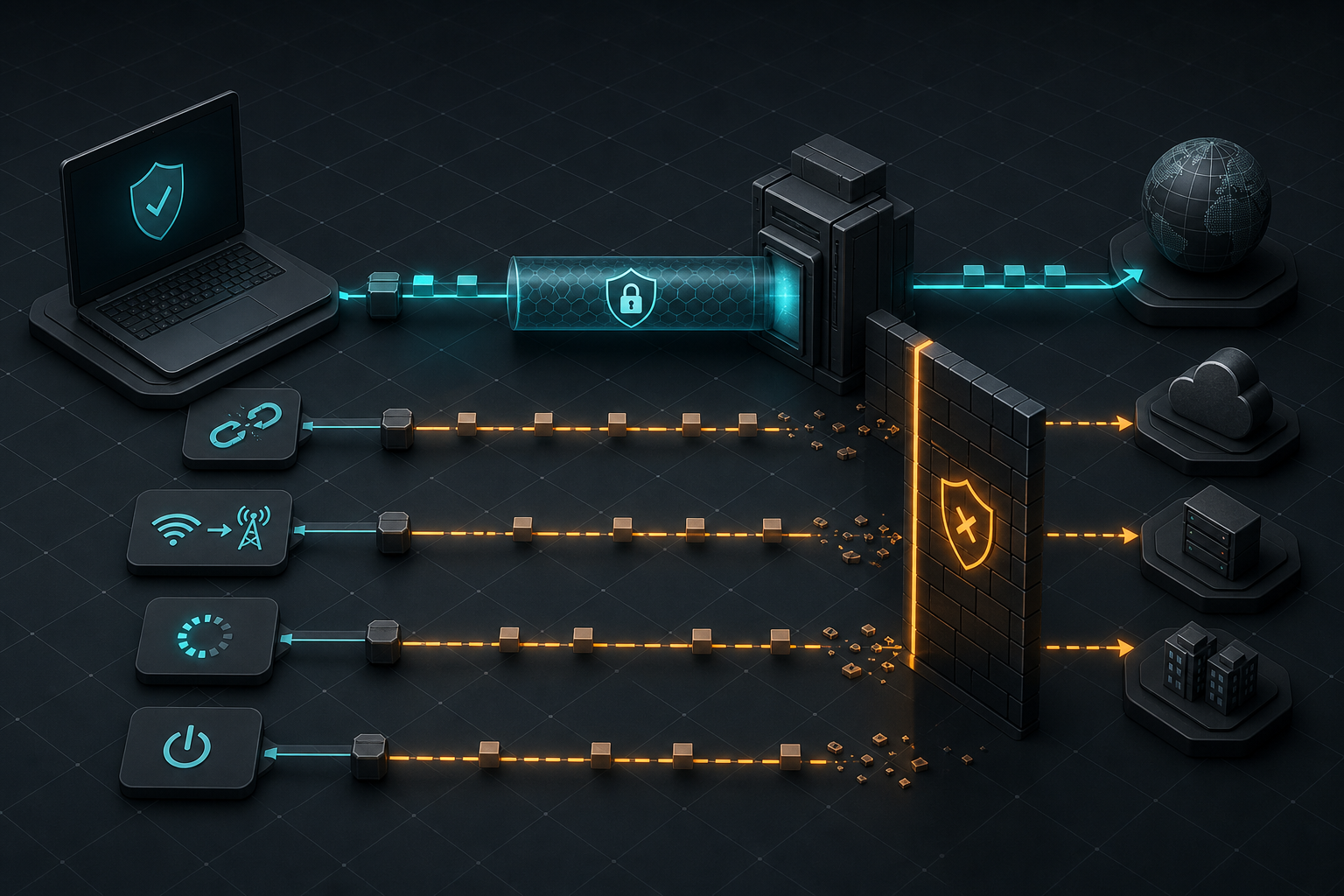
A VPN kill switch is a traffic policy for moments when the encrypted tunnel is unavailable. The useful question is not whether an app has a feature with that name, but which traffic is blocked in each state: before the tunnel starts, while it reconnects, after a network change, after sleep or reboot, during a server switch, after the app crashes, and after a person deliberately disconnects. Providers and operating systems implement different answers.
The strongest validation is a small failure-mode test plan on the exact operating system, VPN app version, protocol, and split-tunnel configuration that will be deployed. Observe public IPv4 and IPv6 egress, DNS resolution, protected application traffic, and intended local-network access while forcing each transition. Record whether the design fails closed, which exceptions remain, and how users recover. A green connected indicator proves only the steady state.
Key Takeaways
- check_circle Define whether the policy should block only accidental drops or every non-VPN state, including manual disconnect and reboot.
- check_circle Treat operating-system lockdown, provider kill switches, always-on reconnect, and split tunneling as separate controls.
- check_circle Test cold boot, app crash, server switch, sleep and wake, Wi-Fi handoff, captive portals, and tunnel failure on real devices.
- check_circle Observe IPv4, IPv6, DNS, protected apps, bypassed apps, and local-network traffic instead of checking one public IP page.
- check_circle Keep the tunnel's required control path narrow; the VPN endpoint must remain reachable without becoming a general bypass.
- check_circle Repeat the test after operating-system, VPN client, protocol, policy, or endpoint changes.
Kill Switch Is An Ambiguous Product Term
A basic kill switch often activates only after an established tunnel drops unexpectedly. That can protect an active browsing session while still allowing ordinary internet access before the user connects or after the user presses Disconnect. A permanent or advanced mode usually expresses a stricter rule: no public-network traffic unless the VPN is usable. Those are different security properties, even when the interface presents both under one feature name.
Proton VPN's current documentation makes the distinction explicit. Its standard mode responds to an accidental loss but does not block traffic after deliberate disconnect. Its advanced mode on supported desktop platforms permits internet access only through the VPN and persists across restart. The same documentation lists platform-specific limitations and interactions with split tunneling. The point is not to rank one provider. It is to show why a feature name cannot substitute for documented state behavior.
Mullvad documents another model: its app has an integrated kill switch that blocks traffic while the VPN is active and the tunnel fails, while quitting or disconnecting changes the state. Providers may also offer a separate lockdown setting. Read the exact platform documentation because Windows firewall rules, Linux routing and packet filters, Apple Network Extension behavior, and Android's system VPN controls do not share one implementation.
Always-On And Lockdown Solve Different Parts
Always-on behavior tries to start and restart a VPN. Lockdown behavior decides what happens to traffic while the VPN is not ready. Android exposes both concepts. Android Enterprise documentation says always-on VPN can start at boot and stay running, while the separate Block connections without VPN option forces traffic through the selected VPN. A deployment that enables only automatic reconnect may still have a fail-open interval, depending on the app and policy.
Android's platform documentation also supports per-app allow and disallow lists. With blocking enabled, apps outside the permitted VPN set may lose network access rather than use the underlying network. That can be the correct fail-closed result, but only if administrators know which apps are supposed to work. An allow list that omits authentication, update, or device-management components can turn a privacy control into an availability incident.
Apple's managed Always On VPN is a stronger and more specific platform control than a generic consumer toggle. Apple says it requires device supervision, remains active across restarts, ties tunnel state to network-interface state, and drops all IP traffic if the tunnels are not up. That property applies to the managed configuration Apple documents. It should not be assumed for every third-party VPN app or every user-controlled kill-switch setting on an Apple device.
The Tunnel Needs A Deliberate Escape Path
A full-tunnel VPN cannot send its own encrypted packets back into itself. It needs a narrow path to the VPN server over the underlying network. Android's VpnService API exposes a protect operation for this purpose: a protected socket goes directly over the underlying network instead of being routed into the VPN interface. WireGuard's routing documentation likewise shows explicit endpoint routes and policy-routing techniques that keep tunnel transport reachable.
That exception is necessary, but it has to remain specific. A rule intended for the VPN endpoint should not become a broad route that other applications can use. Hostname resolution for the endpoint, endpoint address changes, multiple server addresses, IPv6, roaming between interfaces, and captive-portal handling can all complicate the rule set. A provider app may manage these details, but administrators still need to test the resulting behavior.
Local network access is another deliberate exception. Printers, casting devices, file shares, and captive-portal pages may need communication outside the tunnel. Some clients offer a local-network toggle; some lockdown modes block it. Decide whether local subnets are trusted in the deployment threat model. Then verify the exception cannot reach public destinations and does not silently widen when the device joins a network that uses an unexpected private address range.
Split Tunneling Changes The Meaning Of A Leak
With split tunneling, some traffic is designed to bypass the VPN. Seeing the device's ordinary public address from an excluded application is therefore not automatically a kill-switch failure. The control should preserve the intended division when the tunnel drops: protected applications or destinations remain blocked, while explicitly excluded traffic follows the documented policy. A test that ignores the split definition cannot distinguish a bypass from a defect.
Provider support varies by platform and mode. Some combinations disable split tunneling when a kill switch is active; others support both and apply blocking only to protected applications. Reconnect after changing the split configuration if the client requires it, then verify the effective routes and application behavior. Do not rely on a stale settings screen after an update or protocol change.
DNS deserves its own observation. A protected application may be blocked from making an ordinary connection while its name lookup still leaves through a system resolver, or a bypassed application may intentionally use local DNS. IPv6 can follow a different route from IPv4. Capture or query each path separately and compare it with the written policy. The goal is not zero traffic outside the tunnel at any cost; it is no traffic outside the boundaries the operator deliberately approved.
Test Transitions, Not Just Connected State
Begin with a cold boot on a network that already has internet access. Start a continuous connection from a protected application, observe DNS and both IP families, and record whether any packet leaves before the VPN is ready. Repeat after disabling automatic launch, delaying the client, and preventing the app from authenticating. A permanent fail-closed policy should remain closed even when the client cannot establish a session.
Next force transitions: block the VPN server, kill the app process, change from Wi-Fi to cellular, move between two Wi-Fi networks, sleep and wake the device, switch VPN servers, and change the tunnel protocol. If the device is expected to encounter captive portals, test that state too. Watch the full interval, because a one-second fallback to the physical interface can be missed by a single browser refresh.
Finally test human actions and exceptions. Press Disconnect, quit the app, sign out, remove the VPN profile, and revoke its operating-system permission. Try protected and excluded applications, local resources, software updates, identity flows, and emergency communications. Some actions are expected to disable protection because the user has authority to do so. The test should make that authority visible and ensure managed devices prevent changes that policy does not permit.
Turn Results Into An Operable Policy
Record the device model, operating-system build, VPN client version, tunnel protocol, server profile, kill-switch mode, always-on setting, lockdown setting, split rules, local-network exception, and test network. For each failure, note what was sent, which interface carried it, and how long the state lasted. Screenshots of a settings page are useful evidence of intent, but packet or connection observations are evidence of behavior.
Choose fail-closed scope according to consequence. A journalist, administrator workstation, or managed corporate phone may require permanent lockdown. A general-purpose personal device may need explicit recovery for captive portals or local services. Availability matters: if DNS, device management, or authentication cannot work when the tunnel is degraded, users need a safe and documented recovery path rather than instructions to disable protection until something works.
Re-test after material changes. Operating-system networking updates, a new VPN client, a switch between WireGuard and another protocol, new split-tunnel rules, endpoint rotation, or mobile-device-management policy can change effective routing. The durable control is not the label in the application. It is a tested invariant: traffic that policy marks protected does not reach an untrusted network when the tunnel is unavailable.
Checklist
- Write the expected behavior for accidental drop, manual disconnect, app exit, and reboot.
- Record OS, client version, protocol, server profile, split rules, and local exceptions.
- Observe public IPv4, public IPv6, DNS, protected apps, bypassed apps, and local traffic.
- Force tunnel loss, app termination, server switching, sleep, wake, and network handoff.
- Test before login and before the VPN app finishes starting after a cold boot.
- Confirm the VPN endpoint exception cannot carry unrelated application traffic.
- Document safe recovery when lockdown blocks captive portals, updates, or authentication.
- Repeat after every material OS, VPN client, protocol, routing, or policy change.
Sources
- Android Enterprise Help: Set up VPN and block non-VPN connections open_in_new
- Android Developers: VPN, always-on support, and blocked connections open_in_new
- Android VpnService API reference open_in_new
- Apple Platform Deployment: VPN overview and managed Always On VPN open_in_new
- Proton VPN: Kill switch modes and platform behavior open_in_new
- Mullvad VPN: Integrated kill switch and firewall architecture open_in_new
- WireGuard: Routing all traffic and preserving endpoint reachability open_in_new
Continue Reading

AD FS Zero-Day Puts Token-Signing Keys Behind An ACL Audit
Microsoft says an exploited AD FS flaw can expose token-signing private keys when the DKM container ACL is too broad. July updates detect the condition, but remediation is staged.
Russian Router Targeting Makes SNMP A Perimeter Priority
A new joint advisory details how FSB Center 16 uses weak SNMP, exposed management services, and old Cisco flaws to extract router configurations and preserve access.

MOVEit Transfer Fixes Put Reports And Ad Hoc Sharing Under Review
Progress patched three MOVEit Transfer flaws affecting custom reports, ad hoc transfers, and SFTP availability. Admins need exact version inventory and controlled upgrades.