Break-Glass Admin Accounts Need A Runbook
Community platforms and SaaS workspaces need emergency admin access that works during lockouts, outages, founder turnover, and MFA failures. The hard part is keeping that access usable without making it an attacker shortcut.
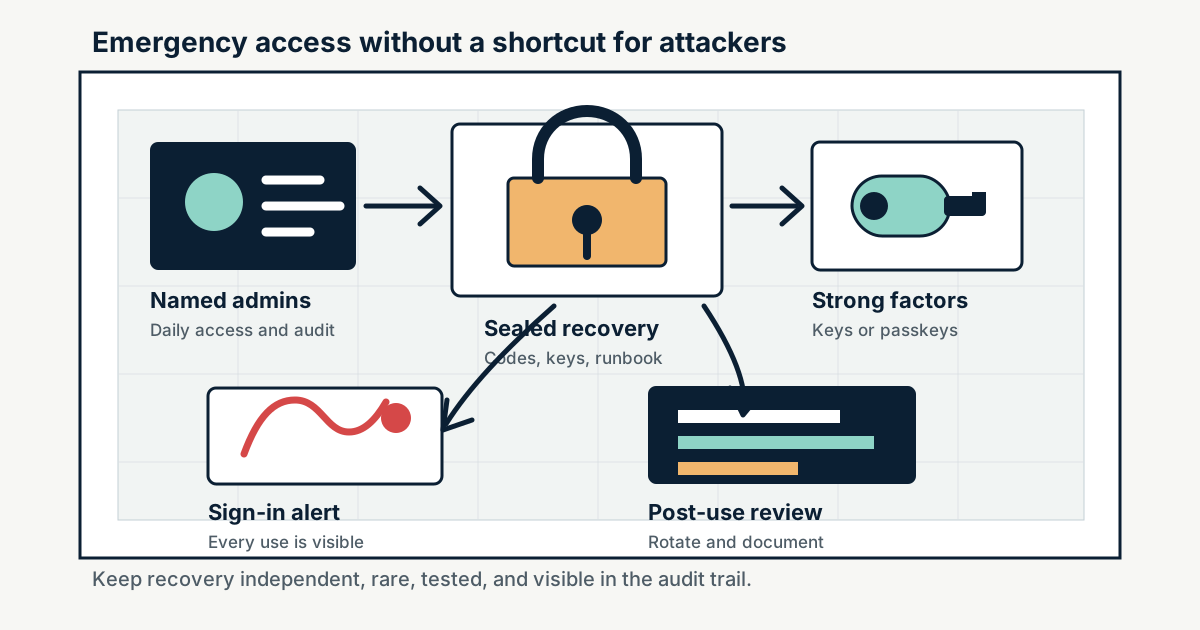
A private community, paid Discord server, Slack workspace, GitHub organization, Google Workspace tenant, or Microsoft Entra tenant can lose control without a breach. The owner leaves, a phone with an authenticator app is lost, a federation provider is down, a conditional-access policy blocks every admin, or an emergency lands on a weekend when only one person knows where the recovery codes are. Emergency access is part of security architecture, not an afterthought.
Break-glass access is the small, documented path for restoring control when normal admin paths fail. It should be rare, monitored, and stronger than ordinary login, but it also has to be independent enough to work during the failure it is meant to fix. The right target is not a shared password in a drawer. It is a controlled recovery design: at least two emergency access paths, phishing-resistant authentication where possible, offline credential storage, role limits, sign-in alerts, regular drills, and a post-use review.
Key Takeaways
- check_circle Emergency admin access protects against lockout as well as intrusion response.
- check_circle The account or credential used for break-glass access should not depend on the same phone, identity provider, device compliance rule, or approval workflow that might be failing.
- check_circle At least two trusted people or two independent emergency paths reduce the chance that a single departure, lost device, or unavailable approver freezes the workspace.
- check_circle Phishing-resistant credentials, such as security keys or passkeys, are preferable for high-privilege recovery where the platform supports them.
- check_circle Every emergency sign-in should generate alerts and a written review because break-glass use is supposed to be exceptional.
- check_circle Recovery codes and backup methods are credentials. They need inventory, storage, rotation, access logging, and removal when trusted operators leave.
Lockout Is A Security Failure
Teams often plan for account takeover but not for account loss. Both can end a community. If the sole owner of a Discord server loses multi-factor authentication and backup codes, support may not be able to remove MFA. If the only GitHub organization owner cannot use two-factor authentication, repository settings, app installs, billing, and incident response may stall. If a Google Workspace super admin account is gone, Google notes that at least two super admins are recommended so one can reset the other. Microsoft makes the same operational point for Entra tenants by recommending two or more emergency access accounts.
The lesson is not that every platform needs identical account mechanics. It is that ownership continuity is a security control. A community may have moderators, billing contacts, bot owners, founders, contractors, and platform administrators. Only some of those people can recover the organization after identity failure. The recovery path needs to be visible before the failure, not reconstructed during it.
Break-Glass Means Independent
An emergency path that depends on the failed system is not emergency access. If ordinary admins sign in through a corporate identity provider, at least one recovery route may need to be cloud-only or otherwise independent of that provider. If ordinary admins use phone prompts, emergency access should not rely on the same phone network or the same person's mobile device. If all privileged roles are eligible and require approval, the emergency path cannot depend on approvers who may also be locked out.
Microsoft's Entra guidance is unusually explicit about this problem. It recommends cloud-only emergency access accounts, strong authentication that differs from normal administrator accounts, safe storage, monitoring, and regular validation. Smaller community operators can adapt the pattern even when they do not run Entra. The important design question is simple: when the normal login, device, approval, or federation path fails, what still works?
Do Not Make The Emergency Account A Daily Admin
Break-glass access should not become the convenient shared admin for routine work. Daily administration should happen through named accounts with least privilege, multi-factor authentication, and normal audit trails. The emergency account should sit idle except during drills or real incidents. If a platform supports role separation, keep ordinary work in narrower admin roles and reserve owner, global admin, or super admin access for the smallest set that can recover the organization.
Idle does not mean invisible. Every sign-in should page or notify the people responsible for security and operations. Microsoft recommends monitoring sign-in and audit logs for emergency access accounts and validating them regularly. The same practice belongs in community platforms: alert on owner sign-ins, backup-code usage, security-key enrollment changes, role changes, app installs, token creation, billing changes, data exports, and recovery-method changes.
Map The Recovery Surface
Most communities do not live in one control panel. A paid community might use Discord or Slack for chat, Stripe for billing, GitHub for code, Google Workspace for mail, a bot host, a domain registrar, a password manager, and a cloud provider. The person called the owner in one system may not control the others. A recovery runbook should name the systems that matter, the privileged roles in each, who can use them, which recovery method exists, and how to prove a request is authorized.
This map should include non-human accounts. GitHub warns that unattended or shared outside-collaborator accounts such as bots and service accounts need two-factor handling when organization 2FA is required. Bot owners, deployment keys, support mailboxes, app store accounts, and payment dashboards can become de facto recovery paths. If they can restore access, remove users, mint tokens, or change where money flows, they belong in the emergency-access inventory.
Drills Prevent Expired Recovery
Emergency access decays. Security keys get lost. Recovery codes are used once and not regenerated. Staff leave. Password manager emergency contacts change. Phone numbers are reassigned. Domain renewals move to a new card. Conditional-access policies expand. A runbook that worked last quarter may fail during the next outage unless someone tests it.
A practical cadence is quarterly for high-value communities and after any major staff change. Test that emergency credentials still exist, can sign in, trigger alerts, and can perform a harmless administrative action. Confirm that the people named in the runbook still have authority and know the process. Rotate safe combinations or shared recovery material when trusted operators leave. Record the drill, then close any gaps while the situation is calm.
After Use, Treat It Like An Incident
Break-glass use should leave a paper trail. Record who authorized it, who used it, why normal access failed, what actions were taken, what logs were preserved, what credentials were exposed, and what has to be rotated. If the use followed a suspected compromise, assume the emergency path itself may now be known to an attacker and rotate every credential that could have been observed.
The post-use review should also ask whether the emergency path was too broad or too narrow. If the account could export all data when it only needed to restore an owner, reduce privilege or add procedural control. If it could not fix the lockout, improve the runbook. The goal is not to celebrate a rare login. It is to ensure the next emergency does not turn one lost phone, one departed founder, or one bad policy into permanent loss of the community.
Checklist
- Maintain at least two independent emergency access paths for each critical workspace or tenant.
- Use phishing-resistant authentication for emergency access where the platform supports it.
- Store recovery codes, security keys, and runbooks in separate protected locations with named custodians.
- Alert on every emergency account sign-in, backup-code use, owner-role change, and recovery-method change.
- Test the recovery process at least quarterly and after founder, admin, or contractor turnover.
- Perform a written post-use review and rotate exposed emergency credentials after any real break-glass event.
Sources
- Microsoft Learn: Manage emergency access accounts in Microsoft Entra ID open_in_new
- Google Workspace Help: Prebuilt administrator roles open_in_new
- GitHub Docs: Requiring two-factor authentication in your organization open_in_new
- Discord Support: How to recover your account when locked out of MFA open_in_new
- NIST SP 800-63B: Authentication and Lifecycle Management open_in_new
- FIDO Alliance: Passkeys open_in_new
Continue Reading
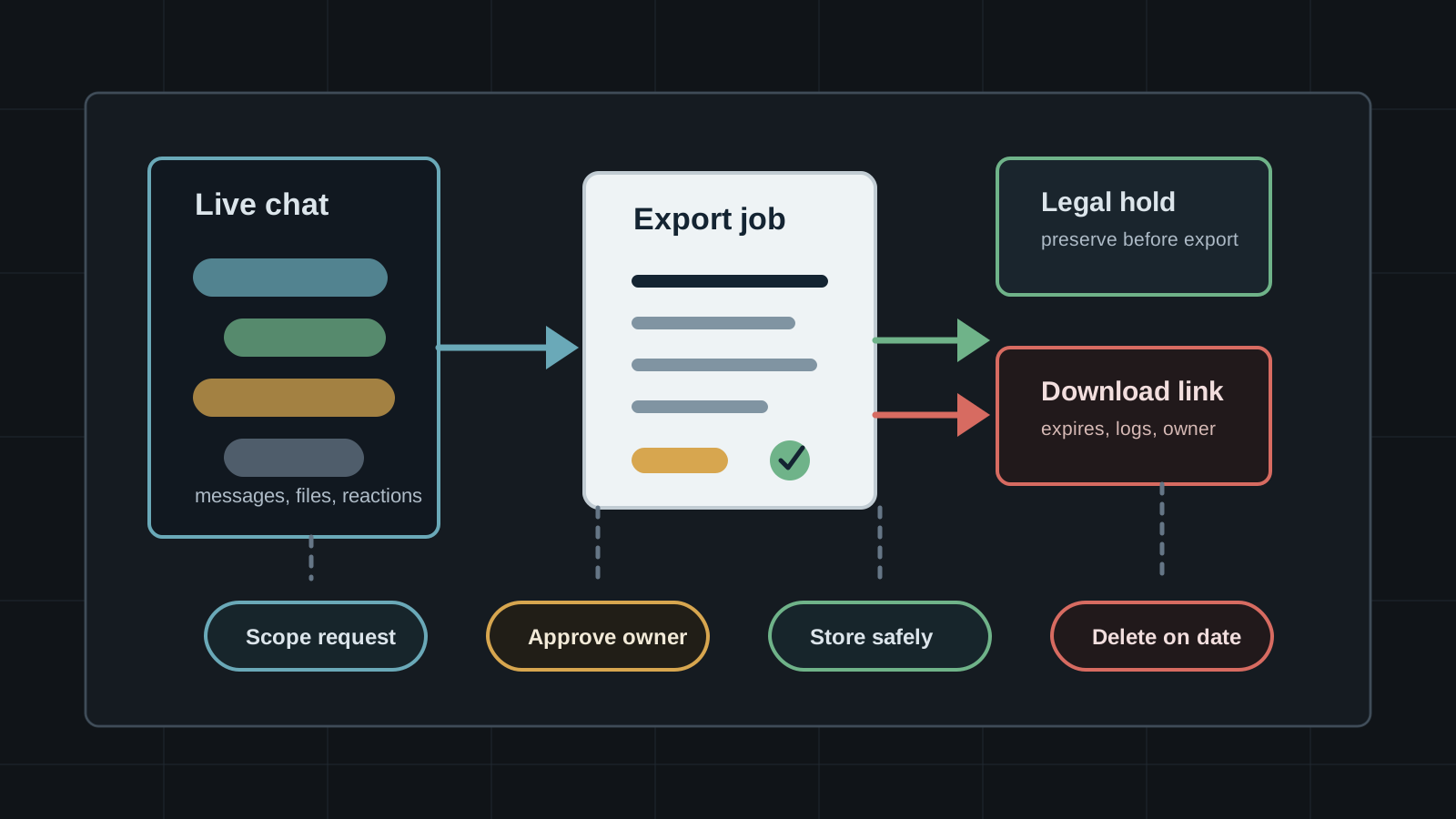
Chat Exports Need Access Controls
Slack, Discord, Telegram, Google, WhatsApp, and Teams all give users or admins ways to pull conversation data out of the live app. Export policy decides whether history becomes evidence, migration material, or a new leak.
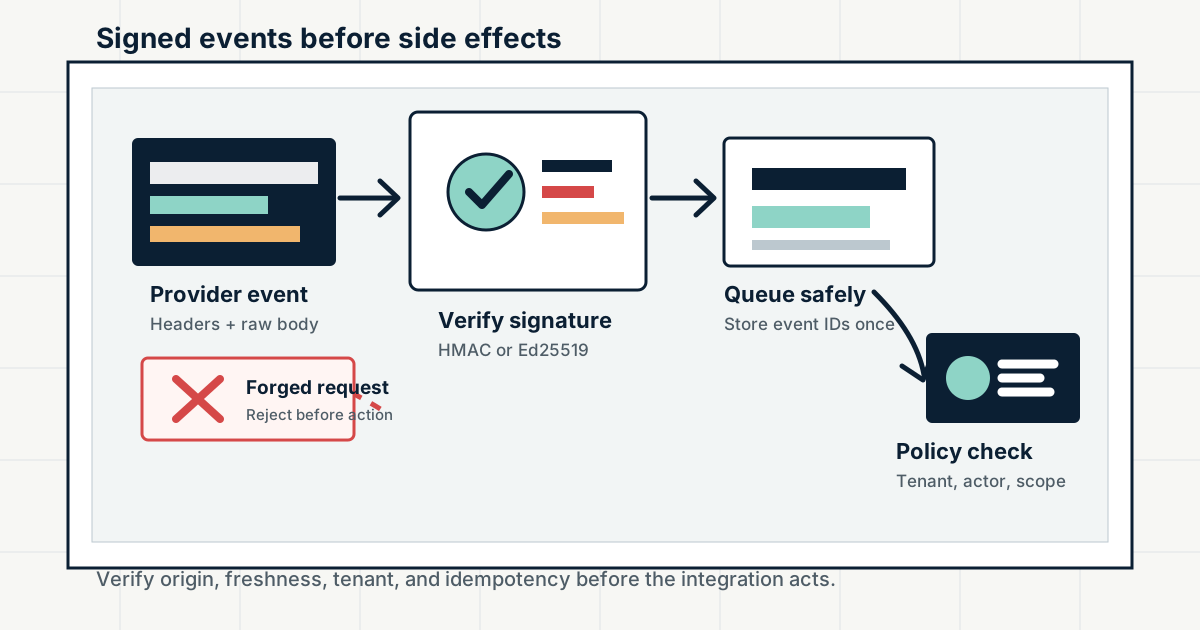
Inbound Webhooks Need Signature Checks
Slack, GitHub, Discord, Stripe, and other platforms send high-trust events to public endpoints. Signature verification, replay windows, raw-body handling, and idempotency decide whether a webhook is evidence or attacker input.
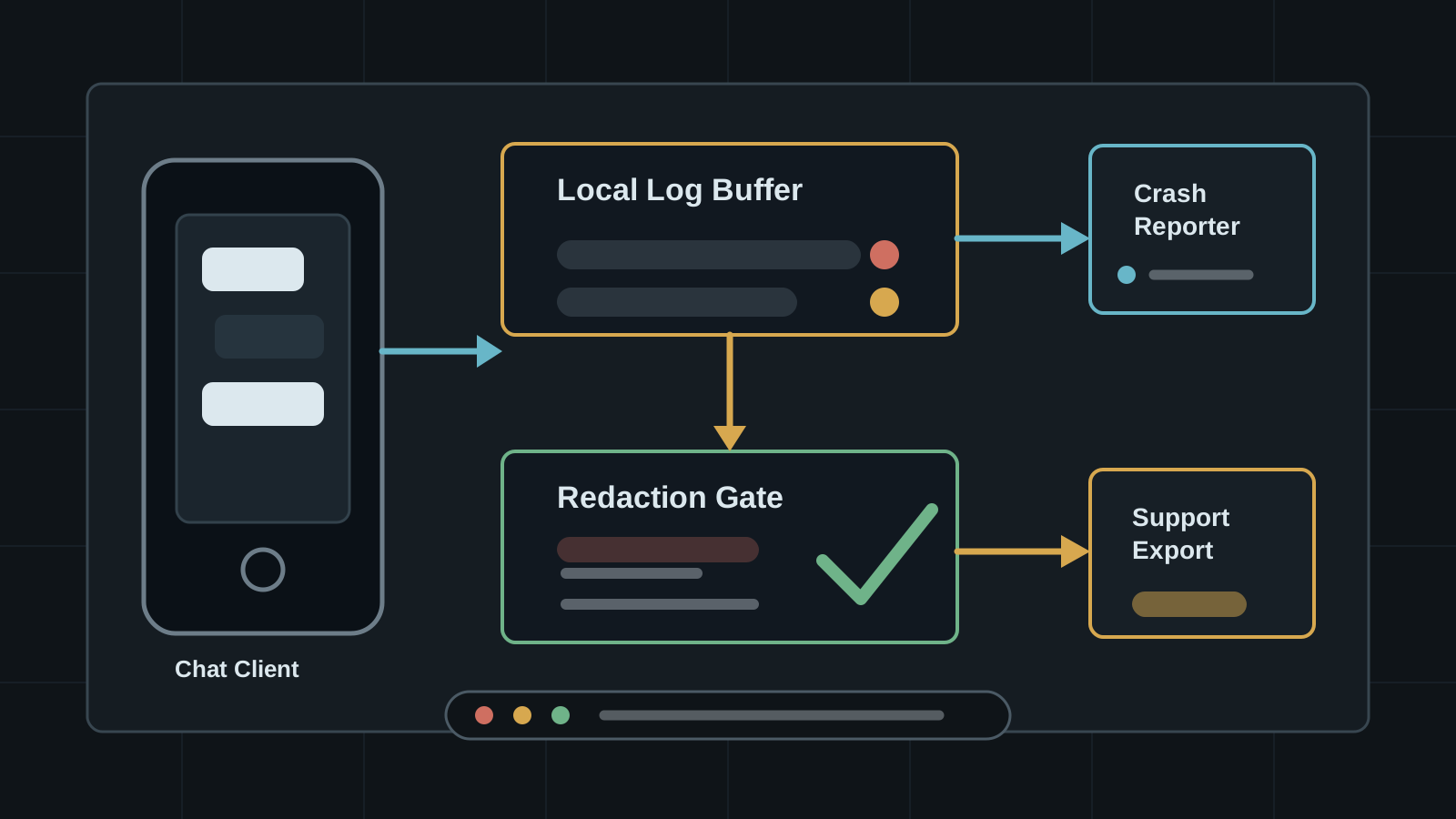
Mobile App Logs Can Become Private Chat Data
Debug logs, crash reports, and support bundles can capture identifiers, tokens, message snippets, and device context. Chat apps need logging policy before troubleshooting becomes data exposure.