WPManageNinja Update Compromise Requires More Than A Clean Plugin
A forgotten WPManageNinja server served tampered plugin updates. Clean files alone do not remove persistence, administrator access, or stolen credentials.
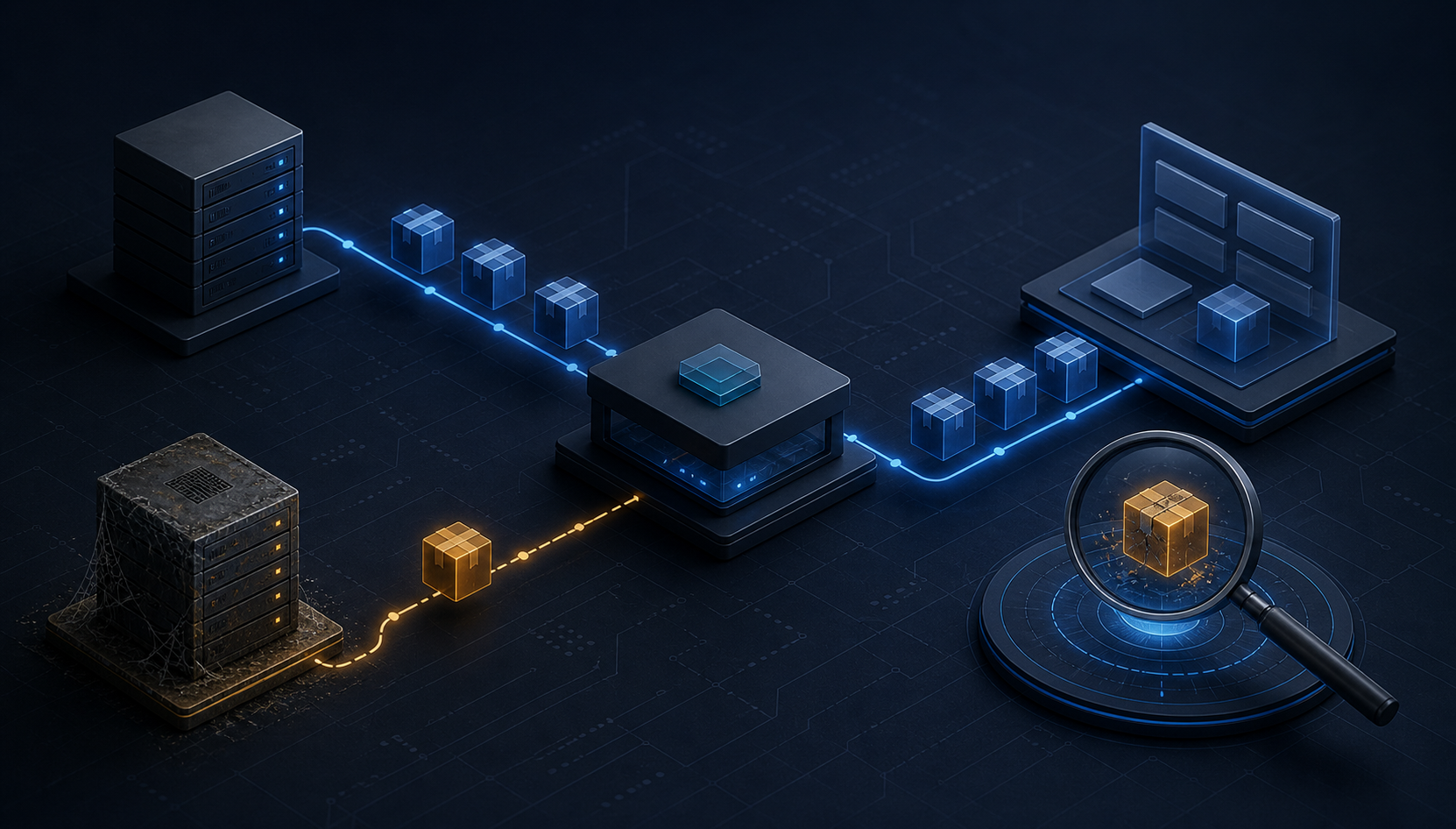
WPManageNinja says an attacker entered an old server that should have been retired and used it to serve tampered Fluent Forms Pro 6.2.7 and Ninja Tables Pro 5.2.11 packages through the company's normal update proxy. The malicious files were available for roughly five hours on July 31. The vendor says about 295 customer accounts downloaded the tampered versions, while 1,368 customers received precautionary notices because its logs could not prove which cached copy each site obtained.
Updating to a clean plugin removes the original altered files but does not establish that a site is clean. WPManageNinja says the code could create database persistence, scheduled tasks, must-use plugins, PHP files under uploads, passwordless administrator access, and access to credentials stored by WordPress or connected services. Operators with an in-scope update must investigate the site, remove persistence in the right order, verify it stays gone, and rotate credentials only after containment.
Key Takeaways
- check_circle The vendor attributes the incident to a forgotten legacy server and stale proxy routes, not a flaw in the normal actions taken by customers.
- check_circle The confirmed delivery window was approximately 14:00 to 19:00 UTC on July 31, 2026, with possible cached delivery on August 1.
- check_circle Fluent Forms Pro 6.2.7 and Ninja Tables Pro 5.2.11 were the tampered builds; the vendor identifies 6.2.10 and 5.2.14 as the first clean replacement versions.
- check_circle WPManageNinja says around 295 customer accounts downloaded a tampered build and that 97.5 percent of affected sites it was tracking had been cleaned by August 7.
- check_circle A clean current plugin version does not erase database rows, cron jobs, must-use plugins, uploaded PHP, administrator access, or credentials exposed while the implant ran.
- check_circle Auto-update is not the root failure. Update infrastructure needs decommissioning proof, route inventories, artifact integrity, and recovery telemetry in addition to rapid patch delivery.
A Trusted Update Path Reached A Forgotten Server
WPManageNinja's incident report says it had migrated store and licensing functions away from an Easy Digital Downloads environment but left the old server running. Proxy rules also continued to send some update endpoints to that system. After someone gained access to the old server, altered packages could travel through the existing proxy and arrive as normal updates. Customers did not need to follow a strange link, install a pirated plugin, or ignore a warning.
The vendor says changed Fluent Forms Pro 6.2.7 and Ninja Tables Pro 5.2.11 packages were available from about 14:00 to 19:00 UTC on July 31. It stopped the delivery, removed access, changed involved credentials, removed the stale routes, shut down the old server, and released clean builds that evening. Because network caches could retain a package, the vendor tells customers to check update activity on both July 31 and August 1.
Two CVE records published in August identify the tampered builds as CVE-2026-73532 for Fluent Forms Pro and CVE-2026-73533 for Ninja Tables Pro. Those identifiers make the event easier to track in vulnerability systems, but this is not a conventional input-validation bug solved by replacing one function. The malicious package ran with the authority WordPress gives installed plugin code, so recovery must account for actions taken after installation.
The Notification Count Is Intentionally Wider Than Confirmed Delivery
WPManageNinja says its records show about 295 customer accounts downloaded the tampered version. It notified 1,368 customers whose sites downloaded either product on July 30 or July 31 because request logs did not establish which backend or cached object answered every download. That is a useful uncertainty boundary: being notified does not prove compromise, while the absence of a precise server-side match does not prove that a site was safe.
The company reported on August 7 that it had helped clean about 97.5 percent of the affected sites it was tracking, with most remaining systems described as staging or local sites. This is a vendor progress measure, not an attestation for any individual installation. A staging site can still hold production exports, reusable credentials, deployment keys, or a path into the same hosting account, so its label does not remove it from incident scope.
Operators should start with site-level evidence: plugin update history, package versions, filesystem contents, database state, scheduled tasks, web and authentication logs, and the vendor's indicators. A site that already auto-updated again may no longer contain the original changed plugin file. That is good maintenance, but it can hide the delivery artifact while leaving what the code created elsewhere.
Replacing The Plugin Does Not Remove The Implant's Effects
The vendor identifies two extra files in the tampered packages: `fluentformpro/libs/class-license-sync.php` and `ninja-tables-pro/app/Library/updater/NinjaTableDataSync.php`. It also documents a command-and-control domain, `apii.observer`, a `wp-update/v1` REST namespace, several database option names, and twice-daily scheduled tasks. These indicators describe multiple persistence layers rather than one infected file.
WPManageNinja says it observed small PHP files in `wp-content/mu-plugins/` and `wp-content/uploads/`. Must-use plugins load automatically and do not appear in the normal plugin list, while PHP under uploads is abnormal for a standard media directory. The vendor also describes a passwordless administrator bypass, the ability to sign in as an existing low-numbered administrator, creation of new administrators, deactivation of security plugins, additional file writes, and reading database credentials from `wp-config.php`.
That behavior changes the response threshold. If the file or database checks hit, treat the WordPress runtime as compromised rather than merely vulnerable. The attacker may have used a legitimate administrator identity, and audit events can therefore appear under a real staff member's name. Investigators should not blame that person from the username alone; they need session, source, request, and timeline evidence.
Collect Evidence Before Cleanup Changes The State
Before deleting files, preserve a filesystem snapshot, database export, plugin inventory, WordPress and PHP logs, web access logs, hosting audit events, and a record of current users and scheduled tasks. Record timestamps and hashes where practical. This evidence can answer whether the package merely landed, whether its code ran, and whether the operator behind it used the resulting access. A clean malware scan alone cannot answer all three questions.
Follow the vendor's concrete checks across layers. Search plugin directories for the two unauthorized files and search `wp-content` for `apii.observer`. Inspect `mu-plugins` for unrecognized `db-repair-*.php` files and inspect uploads for PHP. Query option values for the command-and-control domain, list cron events for `wp_update_check_schedule` and `wp_license_verify_schedule`, test whether the documented REST route returns anything other than a 404, and review administrator accounts created on or after July 31.
Web logs can add execution evidence. The vendor advises searching for `confirm_admin_email` requests with an unusually long random `wp_lang` value and for `updatelink=` rather than matching only one exact path. It warns that legitimate security tools may generate some similar parameters, so the long token and surrounding context matter. Indicators should be treated as starting points, not as a promise that every variant uses one filename or request shape.
Containment And Credential Rotation Have An Order
WPManageNinja recommends taking an affected site offline or placing it in maintenance mode, deleting the plugin directory rather than merely deactivating it, removing unauthorized must-use and uploaded PHP files, deleting the malicious database rows, and clearing the scheduled tasks. The order matters because a surviving scheduled task can recreate database persistence after an analyst removes it. Re-run every check immediately and again after 24 hours to confirm that nothing returned.
Only after the runtime is clean should operators install a fresh package from the vendor account and rotate access. The vendor calls for new WordPress salts and keys, resets for administrator and other sensitive accounts, revocation of application passwords, and rotation of credentials stored in the site, including SMTP, payment, API, database, hosting, and SFTP secrets. Rotating too early can expose the replacement secrets to code that is still executing.
Shared hosting expands the boundary. PHP running as one site may be able to read or alter neighboring sites when filesystem and account isolation are weak. Check every WordPress instance under the same hosting account, plus deployment pipelines and backups that may have captured the altered package. If clean state cannot be established, restore from a known pre-July 31 backup or rebuild, then import only reviewed data.
Update Trust Needs Decommissioning And Artifact Proof
The vendor says the root operational failures were leaving the old server alive and retaining proxy routes to it. A decommission ticket is therefore not complete when application traffic appears to have moved. Teams need an authoritative route inventory, DNS and load-balancer review, credential revocation, network isolation, storage disposition, monitoring removal, and a final test proving that no production endpoint can still reach the legacy system.
Artifact integrity supplies another boundary. WPManageNinja says it plans checksum-based updating. Stronger designs can produce packages in a controlled build service, sign release metadata, publish immutable hashes, restrict who can promote a version, and verify the artifact at delivery and installation. The proxy should distribute a release object, not decide whether two mutable backend servers happen to return equivalent bytes.
This incident is not a reason to disable automatic security updates across WordPress. Delayed updates leave known vulnerabilities exposed, while this event abused the delivery system itself. The practical answer is layered: rapid updates, recoverable backups, centralized update telemetry, post-install file integrity, least-privilege service credentials, and rehearsed site recovery. Trust in an update channel should be measurable and revocable, not assumed from the button that started it.
Checklist
- Identify every site that updated Fluent Forms Pro or Ninja Tables Pro on July 31 or August 1, including staging and local systems.
- Preserve filesystem, database, user, cron, and access-log evidence before deleting the original state.
- Run the vendor's file, command-and-control, database, REST-route, cron, administrator, and web-log checks.
- If any check hits, isolate the site and remove plugin, must-use, uploads, database, and scheduled-task persistence in the documented order.
- Re-run the checks immediately and after 24 hours, then install a fresh clean plugin package from the vendor account.
- Rotate WordPress salts, account passwords, application passwords, API keys, database credentials, and hosting access only after cleanup.
- Audit sibling sites and retire legacy update infrastructure with route, credential, storage, and shutdown proof.
Sources
- WPManageNinja: July 31 security incident report and indicators open_in_new
- CVE Program: CVE-2026-73532 Fluent Forms Pro record open_in_new
- CVE Program: CVE-2026-73533 Ninja Tables Pro record open_in_new
- WordPress Advanced Administration Handbook: Hardening WordPress open_in_new
- WordPress Documentation: FAQ My site was hacked open_in_new
Continue Reading
SAP Commerce Cloud RCE Makes Redeployment Part Of The Patch
SAP fixed unauthenticated code execution in the Commerce Cloud Data Hub Adapter. Customers must update, rebuild, redeploy, and verify the running release.

Zoom Annotation RCE Makes Meeting Membership An Endpoint Boundary
Zoom patched annotation flaws that could let one meeting participant attack another. Admins need version proof across clients, Rooms, VDI, and SDKs.
Trezor Shipping Breach Turns Order Data Into Wallet Risk
Trezor says ShipMonk exposed contact and address data for 13,689 customers. Devices and keys remain safe, but targeted phishing risk has changed.