Split Tunnels Turn VPN Privacy Into Routing Policy
Split tunneling can save capacity and improve SaaS performance, but it changes the VPN from a blanket privacy control into a routing and access-control decision.
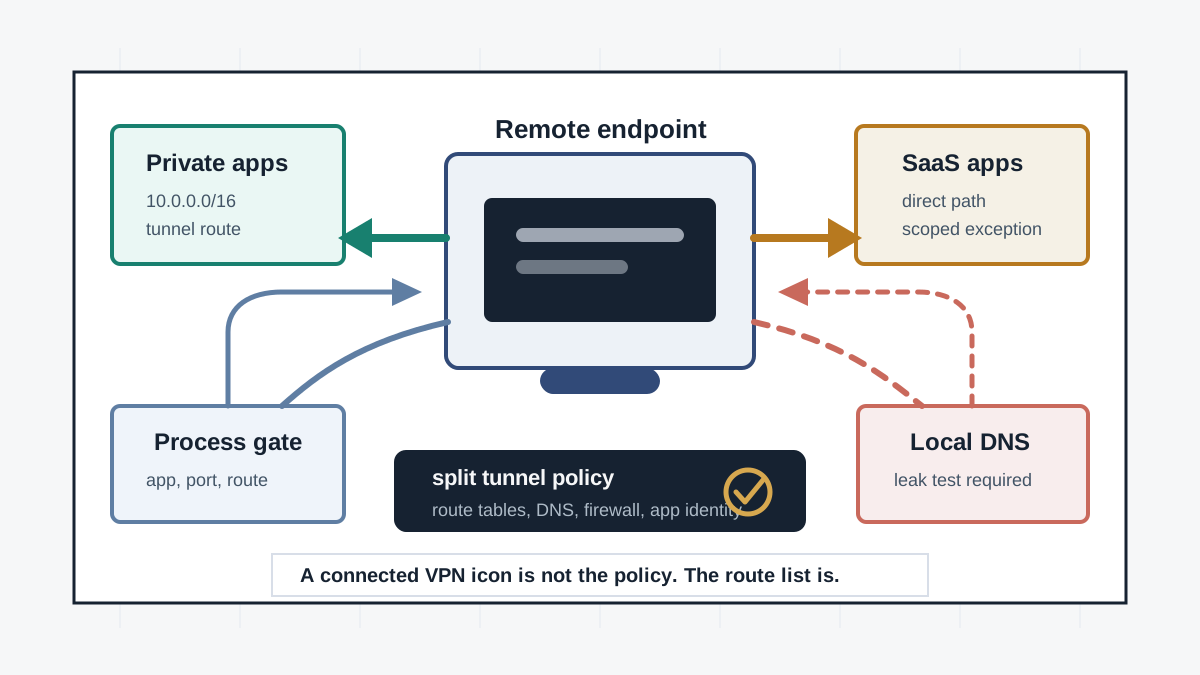
Split tunneling is not automatically unsafe. It is a routing choice. Instead of forcing every packet through the VPN, the device sends only selected destinations, applications, or routes through the tunnel and lets other traffic use the local network directly. That can reduce latency, keep video calls usable, and stop a central VPN concentrator from becoming a bottleneck.
The risk is that users, administrators, and vendors often talk about the VPN as if it still protects everything. It does not. Once split tunneling is enabled, privacy and access depend on route tables, DNS behavior, app identity, local firewall rules, endpoint posture, and exception management. A 2026 research paper on process-scoped split-tunnel authorization makes the core issue plain: a route grant can authorize the whole device, not only the app that needed the route.
Key Takeaways
- check_circle Split tunneling should be documented as policy, not treated as a performance checkbox.
- check_circle Force tunneling sends all traffic through the VPN by default, while split tunneling sends only selected routes through the tunnel and leaves the rest on the physical interface.
- check_circle SaaS split tunneling can be appropriate when exceptions are narrow, encrypted, well documented, and monitored.
- check_circle Privacy VPN users face a different risk: excluded apps, IPs, local DNS, and mixed resource loading can link a VPN exit address to a real network address.
- check_circle Enterprise split tunnels can over-authorize internal access because destination routes are commonly granted at the device level rather than the process level.
- check_circle Good implementations test route tables, DNS paths, kill-switch states, local LAN access, IPv6 behavior, and exception drift.
The Tunnel Is A Route
Microsoft's Windows VPN documentation frames the choice clearly: a force tunnel sends all traffic through the VPN unless a more specific route exists, while a split tunnel uses specified routes for VPN traffic and sends other traffic over the physical interface. That means the user's security posture is no longer described by a single connected or disconnected state. It is described by a set of routes and exceptions.
This distinction matters because many users interpret the VPN icon as a blanket privacy signal. In a split-tunnel configuration, a browser, updater, chat client, DNS resolver, local printer, or cloud app may be outside the tunnel by design. That may be correct. It may also be a surprise. The control has moved from encryption presence to routing intent.
Why Teams Enable It
There are legitimate reasons to split traffic. Microsoft recommends targeted VPN split tunneling for key Microsoft 365 traffic in many remote-work environments because backhauling latency-sensitive SaaS traffic through an on-premises perimeter can hurt Teams, SharePoint, Exchange Online, and VPN capacity. In that model, the exception is not casual bypass. It is a scoped optimization for known cloud endpoints.
The same logic appears outside Microsoft 365. Video meetings, software updates, CDN-hosted collaboration apps, and developer package downloads can overwhelm a centralized tunnel. Full-tunnel VPNs were designed for a world where most important work sat behind the corporate network. Modern work often happens in cloud services with their own TLS, identity, device, and logging controls. Split tunneling is a way to acknowledge that architecture, but it needs explicit security review.
The Privacy Failure Mode
For consumer privacy VPNs, split tunneling changes the promise. An excluded app may reveal the user's residential or mobile IP address while another app uses the VPN exit address. If the same website or tracker observes both paths during one session, it may link the identities. Mullvad's advanced split-tunneling guide warns about this kind of de-anonymization when related resources are loaded through different paths.
DNS deserves special attention. If DNS leaves through a local resolver while web traffic goes through the VPN, the resolver may learn destination names even when the site connection uses the tunnel. If some domains resolve locally and others through the tunnel, operators can create inconsistent routing that is hard for users to reason about. Privacy reviews should test DNS over IPv4 and IPv6, browser secure DNS behavior, captive portals, and network changes.
The Enterprise Failure Mode
Enterprise split tunnels can fail in the opposite direction. The user may not leak privacy data, but the device may gain too much internal reach. The ProcRoute paper argues that many split-tunnel VPN and ZTNA deployments authorize internal routes at the device level. Once the route exists, an unprivileged process on the same host can attempt to use it, even if the intended business app was the reason the route was installed.
That is an access-control problem disguised as networking. A route says where packets should go; it does not necessarily say which process should be allowed to send them. Endpoint firewalls, app control, EDR, cgroup or eBPF policies, per-app VPN, and ZTNA client controls can narrow the gap, but the design question must be asked directly. Which app is allowed to reach which internal service on which port, and how quickly can that authorization be revoked?
How To Scope Exceptions
A good split-tunnel rule starts with a business reason and a bounded destination. For SaaS, use provider-published endpoint guidance where available, prefer narrow IP ranges when the provider recommends them, and document why FQDN or application rules are safe if they are used. For internal applications, restrict destination prefixes and ports, and avoid using a broad private-address route when only one service is needed.
The exception list should be owned like firewall policy. Give each exception an owner, purpose, source of truth, expiry or review date, and test case. Do not rely on a screenshot of a VPN client setting. Store the intended routing state in device management or infrastructure-as-code where possible, and compare endpoints against it. Split tunneling tends to become risky when emergency performance fixes become permanent invisible policy.
How To Test The Boundary
Testing should cover routes, DNS, local LAN access, kill-switch behavior, IPv6, captive portals, and network transitions. Verify what happens when the VPN is connected, disconnected, reconnecting, blocked, and partially failed. Confirm that excluded apps cannot accidentally drag sensitive subresources outside the tunnel and that included apps do not lose DNS protection through a local resolver.
For enterprise deployments, test from a low-privilege process as well as the approved application. If the approved app gets access to an internal route, try a browser, script, package manager, shell, and malware-simulation tool from the same device. The question is not only whether the expected app works. It is whether the split tunnel became a quiet pivot path for anything else running on the endpoint.
Checklist
- Record every split-tunnel exception with owner, destination, app or route basis, review date, and business reason.
- Test DNS, IPv6, local LAN, captive portal, reconnect, and kill-switch behavior.
- Verify that privacy VPN exclusions do not mix related web resources across real-IP and VPN-exit paths.
- Restrict enterprise internal routes by destination and port, and use per-app or process-aware controls where available.
- Compare device route tables and firewall rules against the intended policy after client updates.
- Remove temporary performance exceptions after the incident or capacity event that created them.
Sources
- NIST SP 800-46 Rev. 2: Enterprise Telework, Remote Access, and BYOD Security open_in_new
- Microsoft Learn: VPN routing decisions open_in_new
- Microsoft Learn: VPN split tunneling for Microsoft 365 open_in_new
- ProcRoute: Process-Scoped Authorization of Split-Tunnel Routes open_in_new
- Mullvad: Split tunneling with Linux open_in_new
- WireGuard: Next Generation Kernel Network Tunnel open_in_new
Continue Reading
MLS Makes Group Chat Security A Protocol Integration Problem
Messaging Layer Security standardizes group key agreement, but delivery services, identity, access control, ordering, and backups still decide whether a secure room behaves safely.
Push Notifications Make Secure Chat A Platform Boundary
End-to-end encrypted chat still depends on APNs, Firebase Cloud Messaging, lock-screen settings, and app payload choices. Review notification payloads as privacy infrastructure.
Cisco SD-WAN Manager Exploitation Hits The Control Plane
Mandiant says an attacker used CVE-2026-20245 to turn Cisco Catalyst SD-WAN Manager admin access into root-level control. Patch, hunt, and verify edge-device configuration changes.