Encrypted Chat Backups Move Privacy To Recovery
End-to-end encrypted messages can become recoverable cloud archives through backups, linked devices, exports, and account recovery. Sensitive groups need a backup policy, not only a chat app policy.
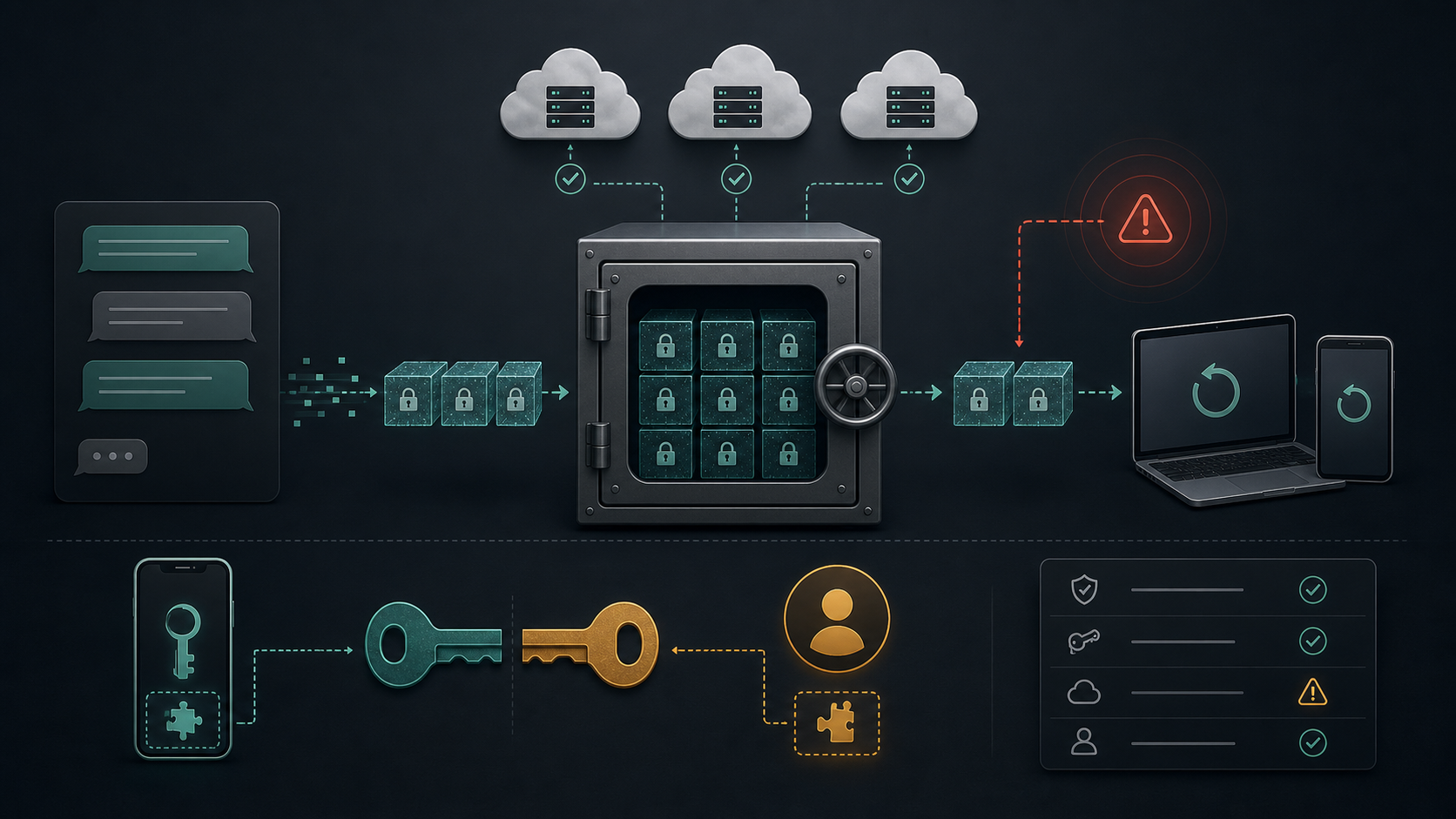
End-to-end encryption protects a message while it moves through the messaging service, but it does not automatically decide what happens after the message lands on a device. Backups, device restores, linked clients, exports, screenshots, account recovery, cloud account compromise, and local malware can all become the practical privacy boundary for a private chat.
The right question for sensitive groups is not only which app encrypts messages. It is who can restore old conversations, which keys protect the archive, whether the provider can help recover it, what happens when an account is reset, and whether members understand the difference between a protected transport path and a recoverable history.
Key Takeaways
- check_circle A message can be end-to-end encrypted in transit while its backup is protected by a different cloud or device recovery model.
- check_circle Default backup settings matter because most users do not revisit them after joining a private group.
- check_circle Recovery design is a tradeoff: stronger recovery reduces data loss, while stronger end-to-end backup encryption raises account-loss risk.
- check_circle Linked desktop sessions, exports, and local notification logs can expose content even when the messaging service cannot read messages.
- check_circle Private communities should write a backup and restore policy before an incident forces rushed decisions.
- check_circle The safest guidance is role-based: casual rooms can tolerate convenience, but legal, finance, safety, health, source, and wallet rooms need stricter controls.
Why Backups Change The Threat Model
End-to-end encryption is often described as a service-side promise: the provider should not be able to read message content as it passes through its servers. That framing is useful, but incomplete. A conversation usually has a longer life than its delivery path. It may be stored on phones, copied into desktop clients, included in device backups, exported for compliance, indexed by operating-system search, or restored onto a new device months later.
Those later copies can be more important than the original transport path. If a user loses a phone and restores a full cloud backup, the privacy of the old chat may depend on the cloud account, recovery key, trusted-device list, or backup password rather than only the messaging protocol. If a user links a desktop client and leaves it signed in on an unmanaged machine, the group has a device-management problem. If a member exports a thread to satisfy a customer-support or legal request, the group has created a new file that needs its own retention rule.
Recovery Is A Product Choice
Backup security always sits between two failures. One failure is account loss: a user replaces a phone, forgets a password, loses a recovery key, or dies without an access plan. The other failure is data exposure: a cloud account is compromised, a recovery flow is abused, or a provider-held key becomes a path to restored content. Different platforms make different choices about where to put that risk.
Apple's iCloud documentation shows the tension clearly. Under standard data protection, many iCloud backups are encrypted in transit and at rest, but Apple stores keys in its data centers so it can help with recovery. With Advanced Data Protection, more categories, including iCloud Backup, become end-to-end encrypted with keys retained by trusted devices, but users must manage recovery contacts or a recovery key. That is not a minor settings difference. It changes who can recover old data and what happens if the account owner loses control of the recovery material.
App Differences Matter
WhatsApp supports end-to-end encrypted backups, but that protection has to be understood as a separate control from message transport encryption. Its security documentation and help center distinguish encrypted messaging from backup configuration. A team that says it uses WhatsApp for sensitive coordination should know whether members have turned on end-to-end encrypted backup, how they protect the password or key, and what account-recovery path would restore old message history.
Signal takes a different approach. Signal's support documentation emphasizes local transfers and backup behavior rather than a provider-readable message archive. Its newer secure backup model is designed around a recovery key and a storage service that does not expose message content to Signal. Even then, the risk does not disappear. A recovery key can be lost, a device can be compromised, and a member can still copy content outside the app.
Telegram is different again. Telegram's FAQ separates cloud chats from secret chats. Cloud chats support synchronization across devices, while secret chats are designed for end-to-end encryption between devices. That distinction is often missed in casual comparisons. For a high-trust group, the operational question is not whether a platform has an encrypted mode somewhere. It is whether the actual room, device set, backup behavior, and restore process match the group's risk.
Linked Devices And Exports
Backups are not the only place where message history leaves the original phone. Linked desktop sessions can hold local databases, cached media, notifications, downloads, and search indexes. A laptop used for community moderation may also run browser extensions, remote support tools, password managers, development tools, and local sync clients. That makes it a materially different exposure surface from a locked phone in a user's pocket.
Exports deserve the same attention. A group archive exported for a moderator handoff, legal review, investor update, customer support case, or incident report becomes a standalone data set. The messaging app's encryption no longer protects it. The file needs access controls, deletion date, owner, storage location, and a plan for redaction. This is especially important for paid communities, creator groups, healthcare-adjacent support spaces, legal matters, financial coordination, whistleblower tips, and crypto communities where a leaked archive can expose identities, wallets, or operational habits.
Admin Policy For Private Communities
Community operators should treat backup posture as part of room classification. A public announcement channel, a casual member lounge, a moderator incident room, and a finance or source-protection room do not need the same rules. The stricter the room, the more explicit the requirements should be: no unmanaged desktop links, no personal cloud exports, end-to-end encrypted backups where supported, disappearing-message settings where they fit the work, and a documented way to recover administrative continuity without restoring everyone else's conversation history.
That last point matters. Many groups solve continuity by giving more people broad access or by retaining long histories forever. Both choices create exposure. A safer design separates operational continuity from message retention. Keep admin credentials, ownership transfer notes, billing details, legal contacts, and emergency procedures in a managed vault or document system. Do not rely on a years-long chat archive as the only record of how the community runs.
How To Set A Safer Baseline
Start with inventory. List which apps hold sensitive rooms, which members can export content, which devices are linked, whether cloud backups include message history, and what recovery settings are active. The goal is not to shame users for wanting convenience. The goal is to stop pretending that the name of the app answers every storage and recovery question.
Then set a baseline by room type. For high-risk rooms, require current app versions, strong device lock, protected cloud account, reviewed linked devices, and explicit backup choices. Use end-to-end encrypted backups where the platform provides them and where members can safely manage recovery. For rooms where losing history would be worse than exposure to the provider's recovery path, document that choice instead of leaving it implicit.
Finally, rehearse the bad day. Decide what happens when a member loses a phone, leaves the organization, reports account compromise, or accidentally posts an export. The response should include device unlinking, session review, backup-key rotation where available, cloud account review, and deletion or containment of exported archives. A backup policy is useful only if the group can act on it under pressure.
Checklist
- Classify rooms by sensitivity before setting backup rules.
- Confirm whether member cloud backups include message history and which encryption mode protects those backups.
- Require strong cloud-account protection for members who hold sensitive group history.
- Review linked desktop and web sessions on a schedule, especially for moderators and administrators.
- Treat exported chats as regulated files with owner, storage location, access list, and deletion date.
- Keep operational continuity records outside chat so old message history is not the only backup of the community.
- Document the recovery path for lost devices, account compromise, departed admins, and leaked exports.
Sources
- WhatsApp Security open_in_new
- WhatsApp Help Center: About end-to-end encrypted backup open_in_new
- Signal Support: Signal Secure Backups open_in_new
- Signal Support: Backup and Restore Messages open_in_new
- Apple Support: iCloud data security overview open_in_new
- Telegram FAQ: How secure is Telegram? open_in_new
- NIST SP 800-63B: Authentication and Lifecycle Management open_in_new
Continue Reading
Telegram Restriction Turns Message Editing Into Platform Risk
India's National Testing Agency says Telegram access is restricted until June 22 and message editing is disabled until June 30 around the NEET re-exam. The practical issue is auditability, not only chat privacy.
SearchLeak Makes Enterprise AI Search A Data Egress Path
Varonis says Microsoft patched CVE-2026-42824 after a SearchLeak vulnerability chain in Microsoft 365 Copilot Enterprise Search. The durable lesson is permission hygiene and output control.
Private Community Invite Links Are Access Tokens
Invite links for Discord, Slack, Telegram, WhatsApp, Signal, and other community tools behave like bearer credentials. Private groups need expiry, approval, rotation, and offboarding rules.